Vendor & PO
Interior design firms buy materials for a project here, from the client’s quote to the vendor’s payment, and I designed it on my own. Over five phases between 2023 and 2025 I built the purchase flow and the spending rules that connect orders to the budget.
- 01Quotation
- 02Material request
- 03Purchase order
- 04Delivery
- 05Invoice
- 06Payment
Budget left on these BOQ lines₹46,920
This PO, on the same lines₹47,640
₹720 over the budget for these linesWhen you send, these rules apply
- !Budget · ask for approvalLines 1 and 5 are above their BOQ rate; together they go ₹720 over.
- ◆Outside-quotation item · approval requiredCove light profile has no BOQ line to check against.
- ✓Order quantity · passesEvery quantity is within MR-003.
Or fix it here
- Use the BOQ rate on lines 1 and 5saves ₹2,220 · clears the budget rule
- Move the cove light to its own POclears the outside-quotation rule
- Role
- Lead and sole designer, research to handoff
- Worked with
- Founders, product, engineering, firms
- Platform
- Web, inside iDesign.Market
- Scale
- 5 phases · ~690 screens, dialogs and drawers · 6 spending rules
Interior firms set their margin in the quotation and lose it one purchase at a time. Nothing checks an order against the budget before the money is committed.
Of every ₹100 a client approves · a schematic, not project data
Four small drifts
Each one is easy to miss. In this example, together they take ₹22 of a ₹30 margin.
- A vendor quotes above the BOQ rate.
- More is ordered than the BOQ allows.
- Parts add up to more than the item.
- The invoice comes in above the PO.
Product context
Interior firms run their projects on iDesign.Market. Vendor & PO is where they buy the materials, against the quotation the client approved.
Terms used on this page
- 1BOQThe approved quotation, line by line: the budget.
- 2BOMWhat one BOQ item is bought as, part by part.
- 3MRThe site’s request for material, with a due date.
- 4POThe order to a vendor, checked before it goes out.
- 5GRNWhat actually arrived, logged against the PO.
- 6Non-tenderBought outside the quotation, with no budget line.
PO-0144Deepanshu Steel Corp. · Sharma Residence
Pending · AvinashRaised from MR-0033 · due Fri
Gypsum board 12 mmBOM2False ceiling
40 × ₹64BOQ ₹581
₹240 overGI channel, 3 mBOMFalse ceiling
60 × ₹145BOQ ₹150
₹300 underCove light profileNon-tender6
18 × ₹210No BOQ line
No budgetGRN-07Challan 0412 · received by Ravi
26 of 40 boards
5User research
I watched session recordings and spoke to purchase teams and owners. This sample follows one item through six hand-offs, from quotation to payment.
1Quotation
BOQ_Sharma_final_v3.xlsx
| Item | Qty | Rate |
| False ceiling | 1,200 sft | ₹85 |
| Gypsum board 12mm | 40 | ₹58 |
| Wardrobe | 3 | ₹48,000 |
1The BOQ stays a spreadsheet. Nothing checks a purchase against it.
2Material request
Ravi · SiteNeed 40 gypsum boards for the bedroom ceiling. By Friday please
A quantity in a message, without the BOQ line it belongs to.
3Rates
Gupta TradersGypsum 12mm, ₹62 a board. Channels and screws extra.
Ok, send 40
2₹62 against a BOQ rate of ₹58, and nobody compares.
3Bought as boards, channels and screws, so the ceiling’s real cost is hard to add up.
4Approval
Fine, go ahead.
4Every firm approves differently, and the rules live in people’s heads.
5“Pending” with whom? Nobody can tell.
5Delivery
DELIVERY CHALLANNo. 0412
Gypsum board 12mm26 nos
Ordered40
Received by__________
6Material arrives in parts, and nobody tallies it against the order.
6Payment
TAX INVOICEINV-2291
Gypsum board 12mm× 40
Rate₹68
Total₹2,720
Billed at ₹68, above the ₹62 agreed. It surfaces when the project closes.
Pain points
What went wrong the old way, and the hand-off where it shows up.
The BOQ stays a spreadsheet.
QuotationVendor rates drift from BOQ rates.
RatesItems are bought as parts.
RatesEvery firm approves differently.
Approval“Pending” doesn’t say with whom.
ApprovalDeliveries come in parts, invoices run high.
Delivery · PaymentCompetitor analysis
I compared how other tools check spending, using public pages, help docs and app listings from 2026. Vendor & PO checks each BOQ line.
| Option | Checks spending against | Site request to PO | Checked before the PO goes out | Built for |
|---|---|---|---|---|
| Spreadsheet and chatWhat most firms use | Whatever’s at hand | Anyone | ||
| ProcoreGeneral contractors | Project budget | counts once approved | Large contractors | |
| Studio DesignerInterior designers | Client proposal | Furnishings | ||
| Houzz ProDesigners and builders | Spending reports | Small studios | ||
| PowerplayIndian contractors | Material and stock | logged on site | Site teams, mobile | |
| OnsiteConstruction firms | Budgets, material use | request, PO, GRN | limits on requests | Site teams, mobile |
| Vendor & POInside iDesign.Market | The BOQ line | MR on BOQ lines | spending rules | Design-and-build firms |
Described in its documentationPartlyNot described on its public pages
What I took from it
Where other products put the budget check, the item record and site work.
Finding 1
Other tools count a PO once it’s approved
Procore counts an approved PO as spent. In my 2026 proposal, I moved the check earlier, into the draft.
Finding 2
One record follows the item
Studio Designer keeps one item record from proposal to invoice. Here the BOQ line does that job.
Finding 3
Site teams work on phones
Powerplay and Onsite are built for them. Requests and delivery logs start on site here too.
Design goals
Drawn from the six problems and the other tools: what the module had to do for a firm.
Goal 1
Check orders before they go out
Compare every order with the BOQ while it can still change.
Goal 2
Let each firm set its own rules
Who approves, and what happens when an order goes over budget.
Goal 3
Link every amount to the step before
Each quantity and amount traces back to the request, order or delivery it came from.
What to check
I followed one item from quotation to payment, mapping each check and where the firm’s spending rules apply.
Design principles
Four rules I set before drawing any screens, and checked each screen against.
Rule 1
Budget data stays with the item
BOQ quantity, rate and what’s ordered, wherever the item appears.
Rule 2
Firms set the rules in settings
Who approves, and what happens over budget, set per firm in sentences.
Rule 3
Warn before a PO goes out
Rate and budget problems flagged while the PO can still change.
Rule 4
Quantities add up step to step
Requested, ordered, delivered and invoiced each trace to the one before.
User flow
Five people move a purchase from quotation to payment. The firm’s rules check the PO after creation, and payments can’t exceed the order and its deliveries.
- Start and end
- A decision
- Stopped or rejected: back to purchase
- nFixes pain point n from the research
Information architecture
Seven lists show the same purchase orders by project or company, with deliveries, GRNs, invoices and logs attached to each PO.
Key flows
A PO can start from an item list, a material request or a blank order. Each route follows the same steps and spending rules.
ItemsChoose what to order
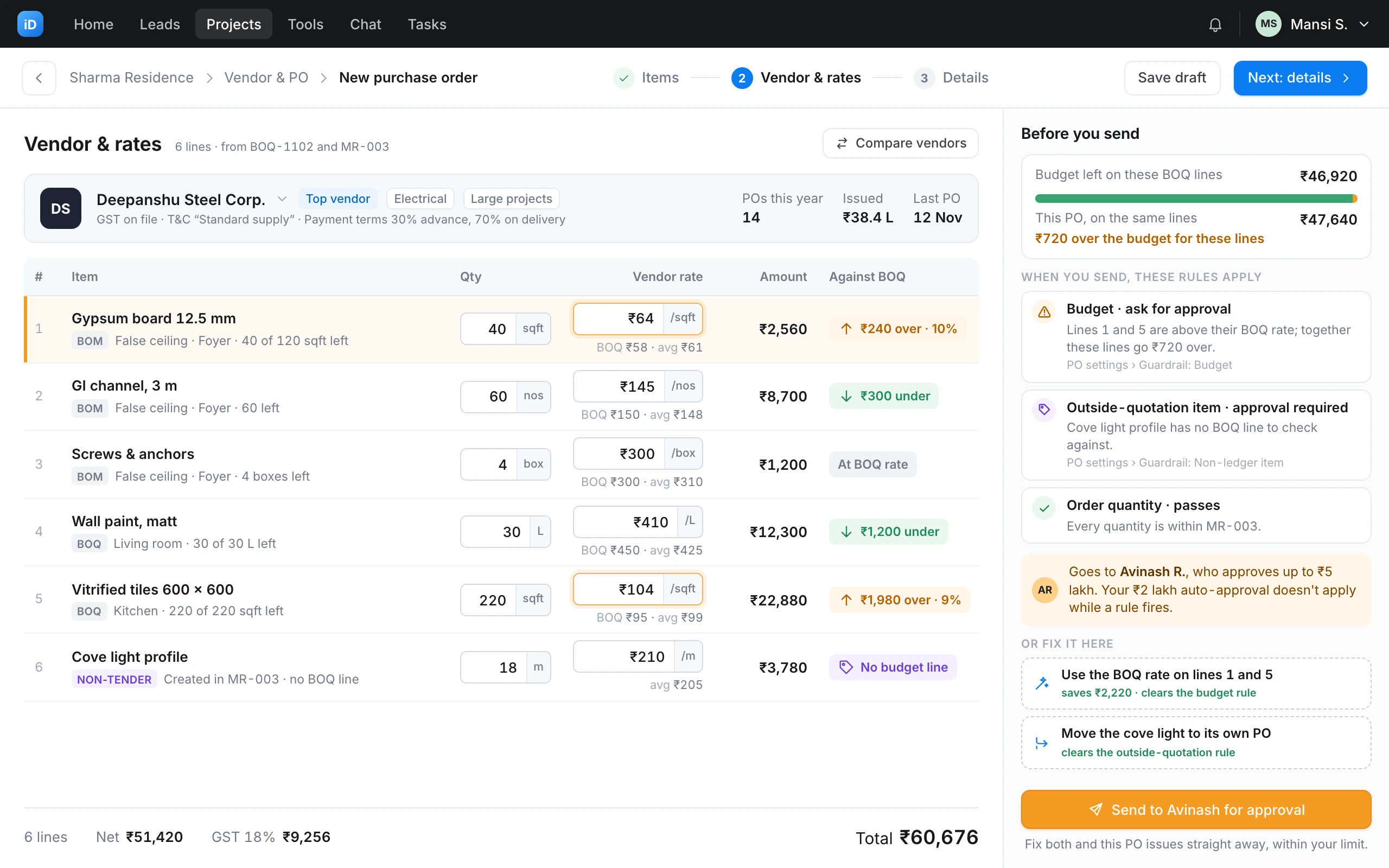
Vendor & rates6 lines · from BOQ-1102 and MR-003
Deepanshu Steel Corp. ▾GST on file · payment terms 30% advance, 70% on delivery
Top vendorElectricalPOs this year14
Issued₹38.4 L
Last PO12 Nov
DetailsDelivery, terms and attachments
Deliver to
Sharma Residence · Site office, 17th Floor▾
Expected delivery
Fri, 15 Nov▾
Payment terms
30% advance, 70% on delivery▾
Terms and conditions
Standard supply▾
Attachments
Drop drawings or a quote here, or browse
Summary
PO numberPO-014
VendorDeepanshu Steel Corp.
Lines6
Net₹51,420
GST 18%₹9,256
Total₹60,676
The firm’s spending rules run when you create it.
Spending rules
Each firm sets, once in settings, what happens when a PO crosses a limit. Every rule has the same three outcomes, each described in one sentence.
Budgetthe PO is over the item’s budget
Outside-quotation itemsno BOQ line to check against
Order quantityissuing more than the MR asked for
Parts of an itemthe BOM ordered piece by piece
PO approvalevery PO, whatever its amount
Auto-approvala spending limit per person
DeliveriesPO-014 · Deepanshu Steel Corp.
+ Log deliveryGypsum board 12.5 mm40 of 40 sqft received
GRN-08Challan 0431 · Fri, 15 Nov · received by Ravi · 2 photos
14 sqftNot billedGRN-07Challan 0412 · Tue, 12 Nov · received by Ravi · 3 photos
26 sqftInvoice bookedReceived can’t exceed issued. A delivery with a booked invoice can’t be edited.
Payment requestPO-014
×AdvanceAgainst delivery
PO amount₹60,676
Already requested₹0
Advance in terms30%
Eligible amount₹18,203
Amount
₹18,203
From delivery to payment
Material rarely arrives in one delivery. Each one is logged against its PO, and every payment request is checked against what’s eligible.
- Each delivery is logged against the PO, with its delivery challan (the vendor’s delivery note) and proof.
- A delivery can be billed once it has arrived, or an advance can be requested before anything arrives.
- Eligible amount = PO amount − amount already requested, adjusted for advances.
- A request above the eligible amount raises an alert before any payment is made.
- Once an invoice is booked against a delivery, that delivery can’t be edited.
Wireframes
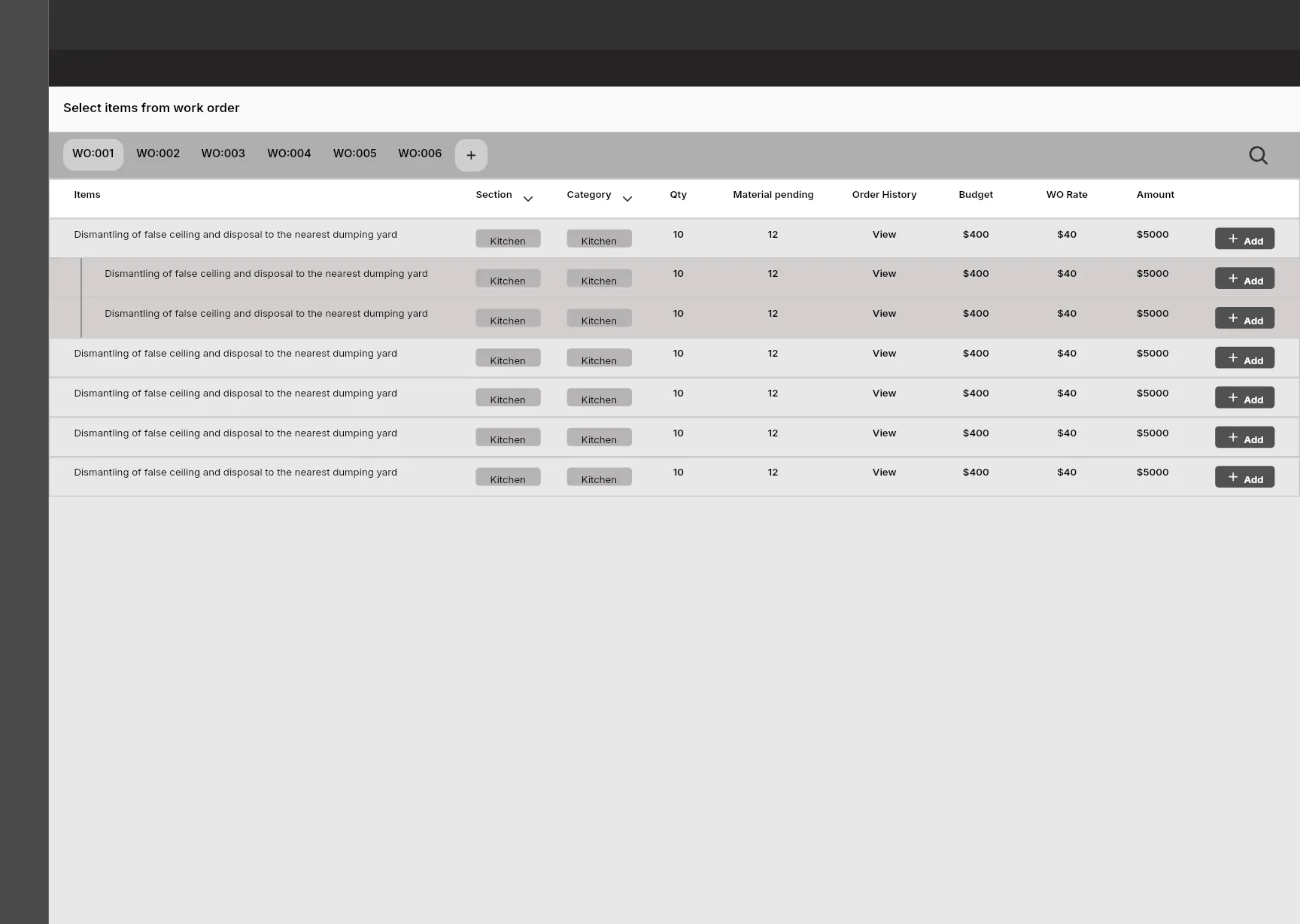
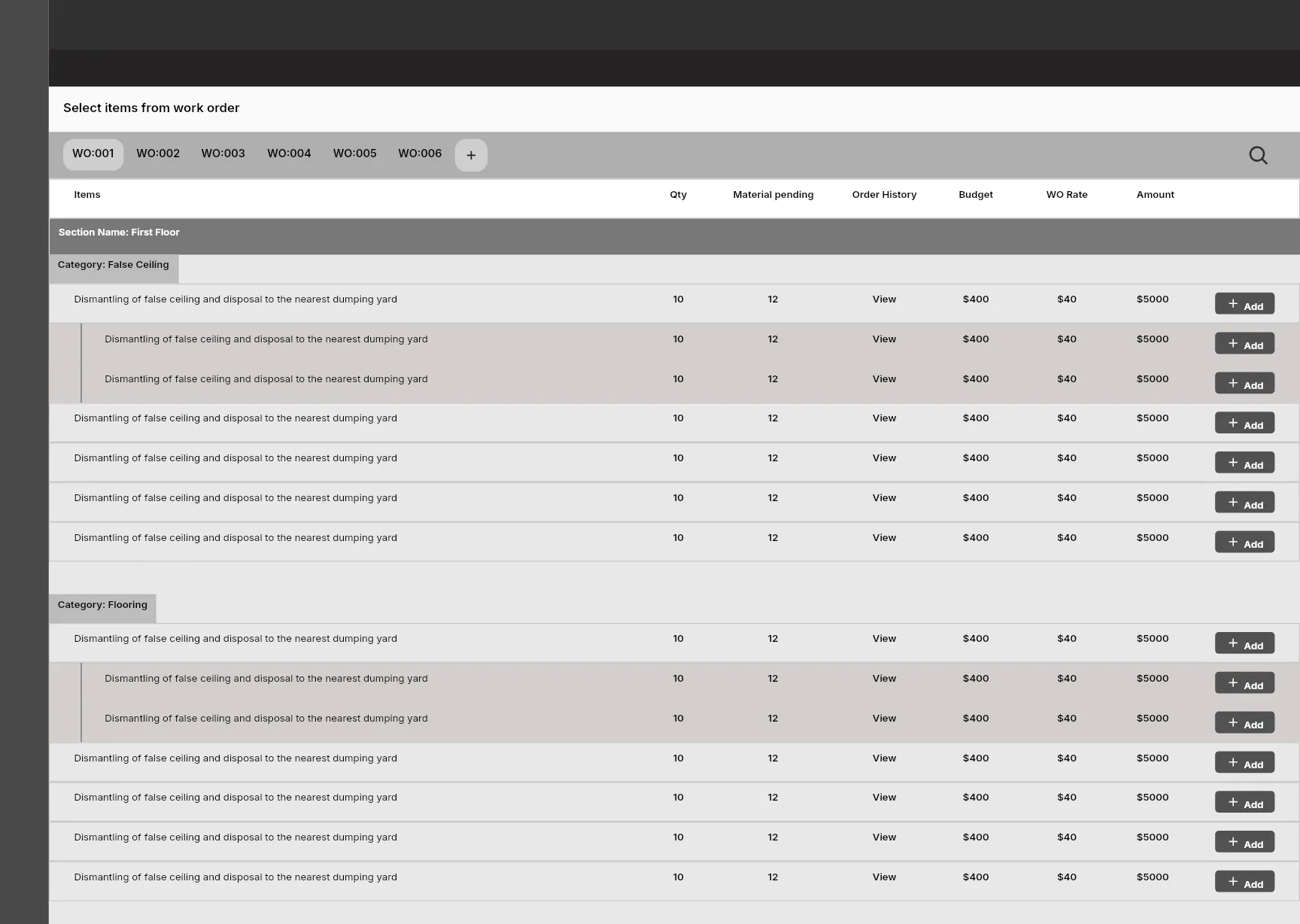
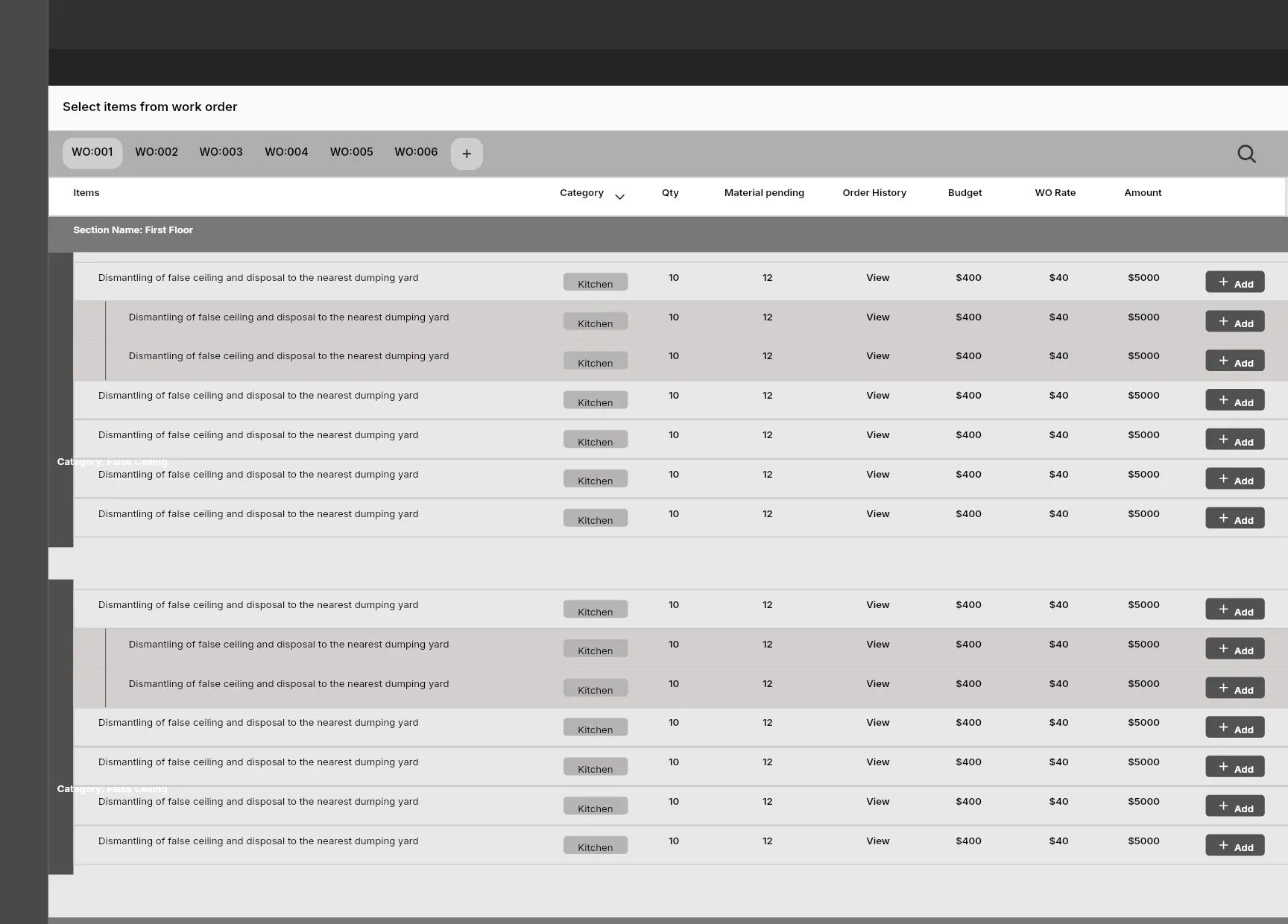
I used greyscale frames to test three ways to group items for a PO, then revisited the approach for invoice booking two years later.
ItemsChoose what to order
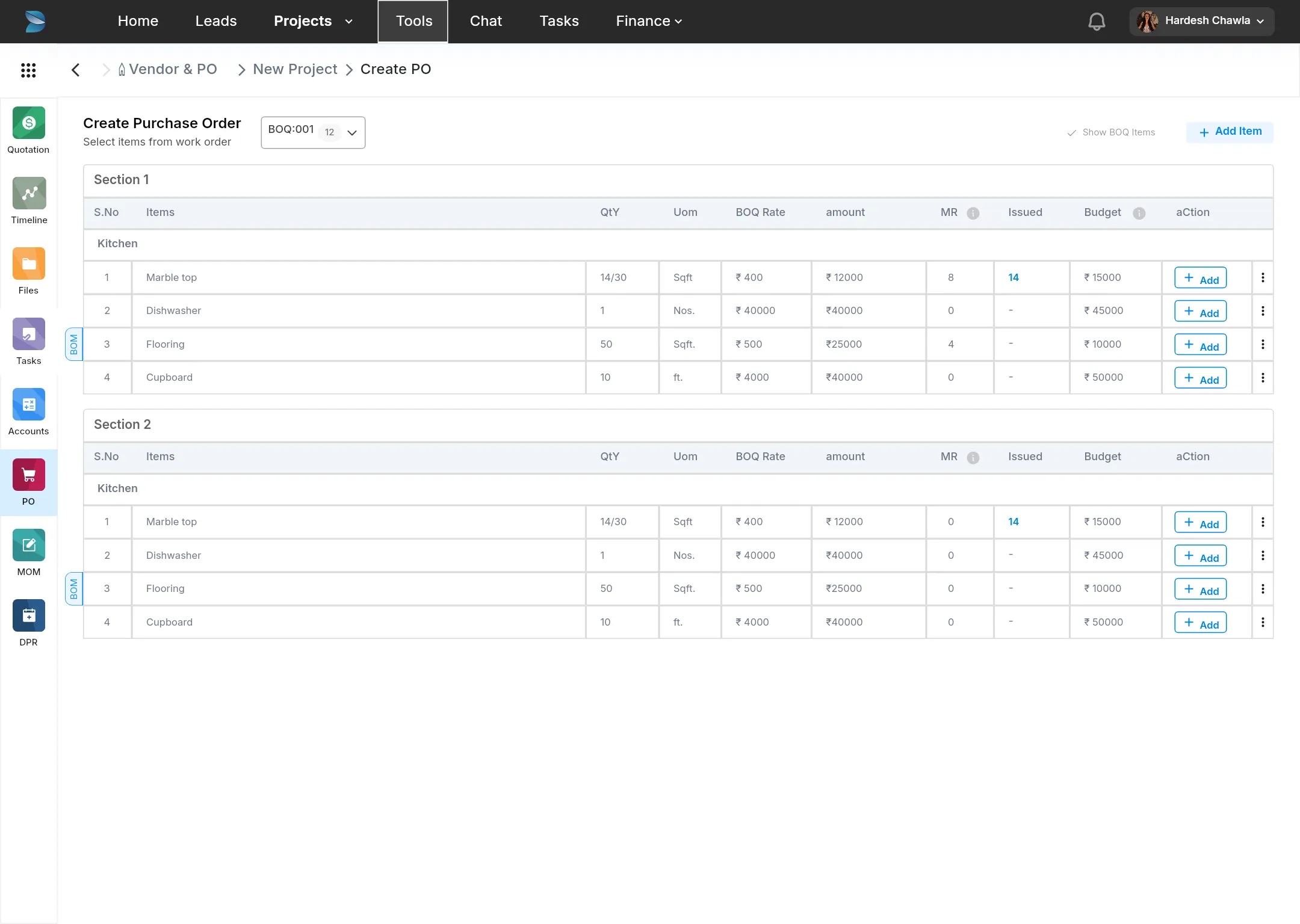
Create PO, step 1
- Three named steps, always in view. The main button names the next one: “Step 2: Vendor details”.
- One tab per BOQ, plus one for non-tender items, instead of one long page listing every quotation.
- MR quantity and issued quantity on every line, next to the budget.
- A status per line (issued, in progress or not issued), so an item isn’t ordered twice.
- Adding an item changes only its button. The row stays where it is, so the list doesn’t shift while you choose.
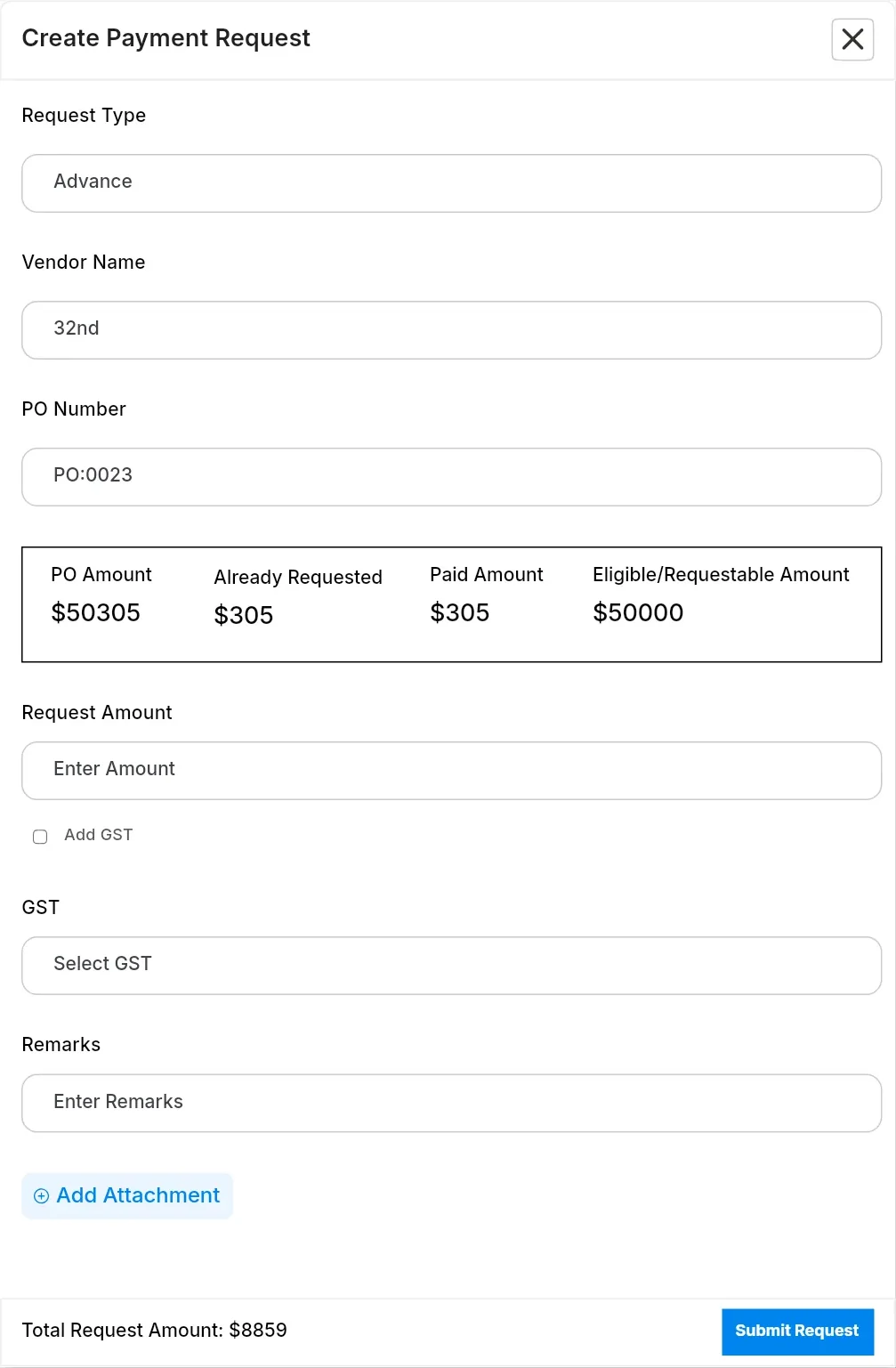
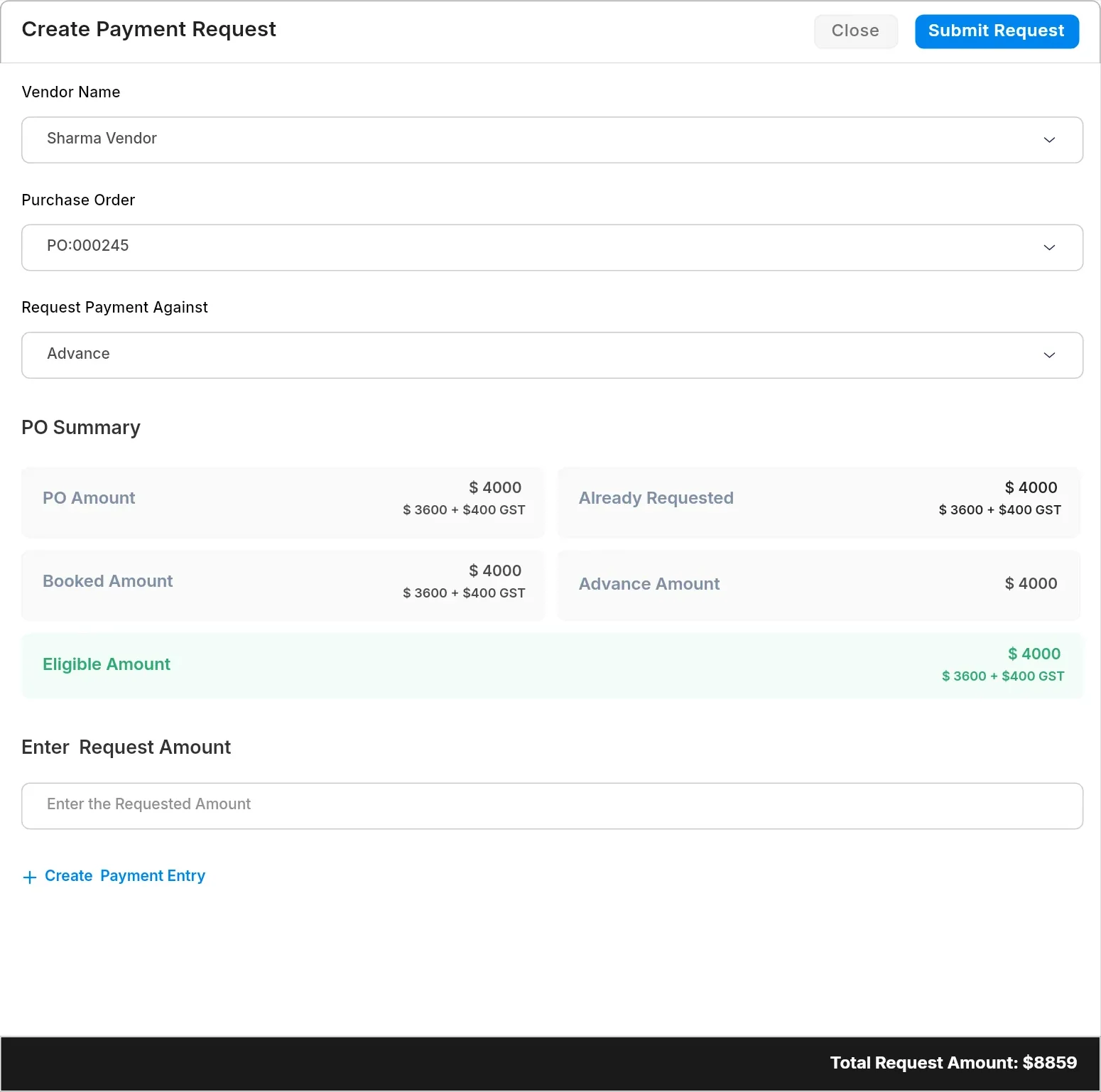
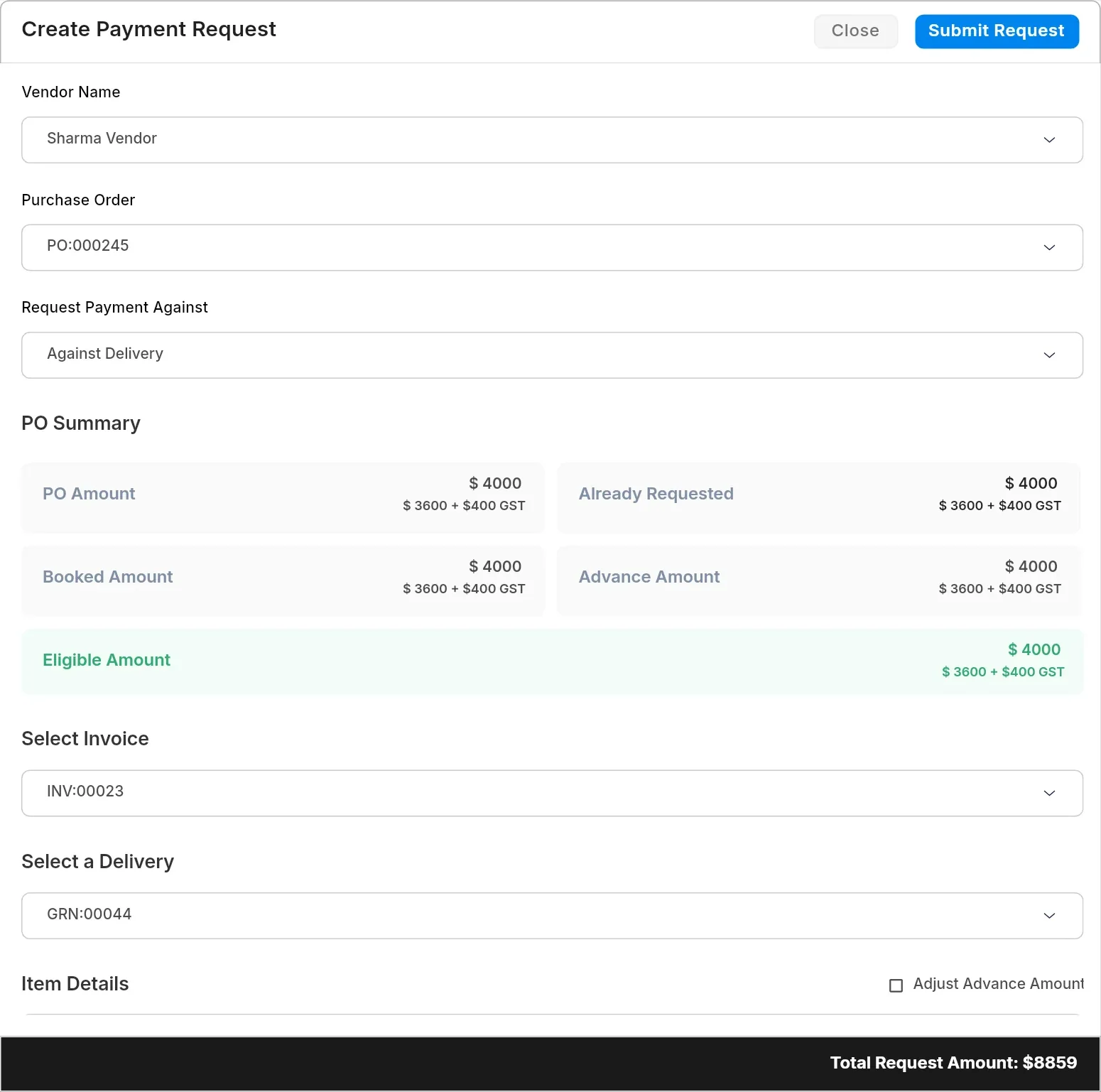
Payment requestPO-014 · Deepanshu Steel Corp.
×AdvanceAgainst delivery
PO amount₹60,676
Requested₹18,203
Booked₹0
Eligible amount₹42,473
Invoice
INV-2291
Delivery
GRN-07 · Challan 0412▾
Payment request
- Advance or delivery comes first, because that choice sets the eligible amount.
- The PO’s figures come before any input: amount, already requested, booked, advance and balance.
- Only the eligible amount is green. It’s the figure to check.
- Invoice quantity per line, checked against what was delivered.
- The total stays pinned to the footer while amounts are entered.
Design system
Most screens show money and whether it’s within a limit, so I added components for both.
Four components on every screen
- 1Amounts₹ 4,00,000Indian digit grouping, tabular figures, right-aligned.
- 2Variances−₹ 8,00,000Signed and coloured. A minus means over budget.
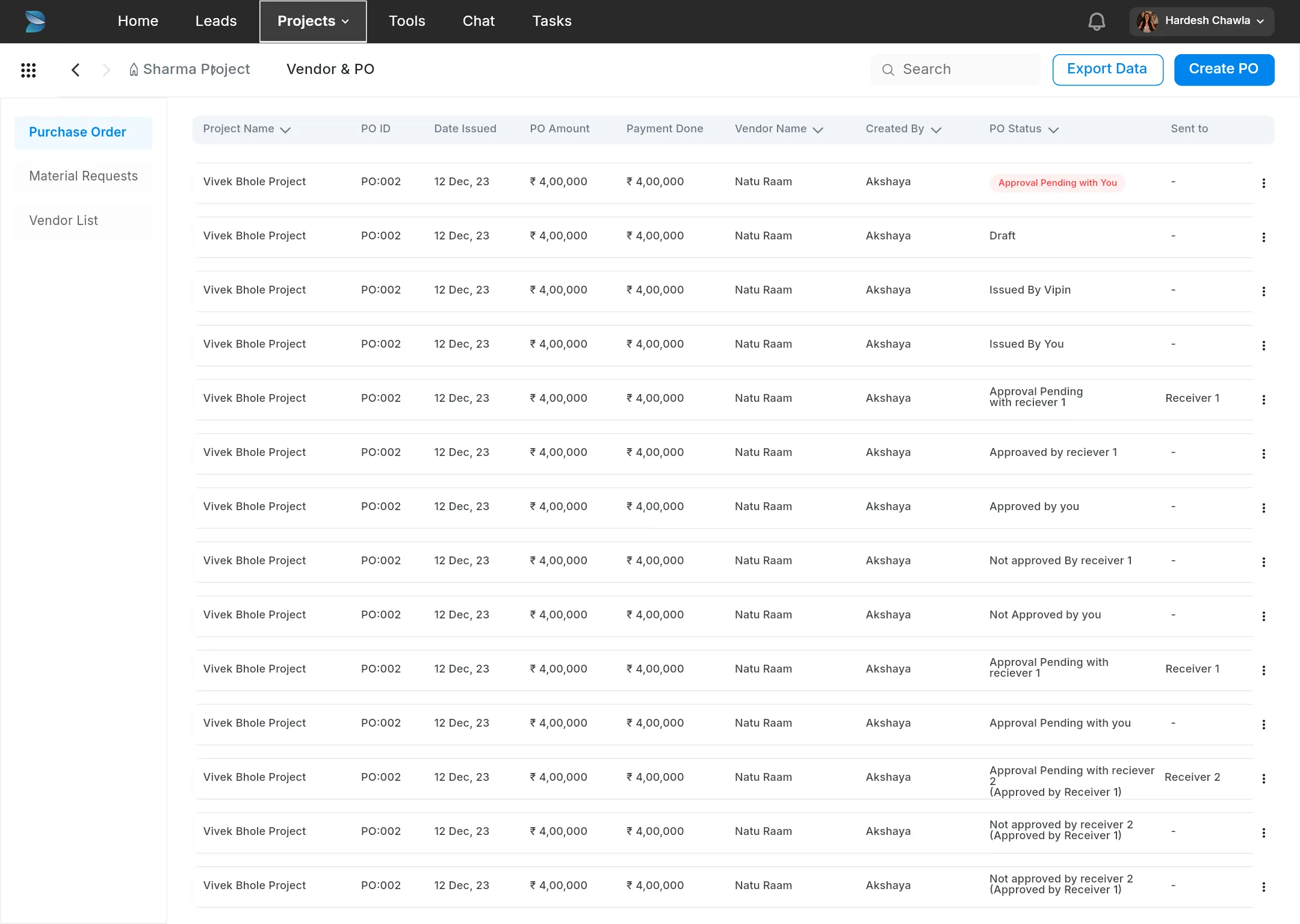
- 3PO statusPending · AvinashNames the person a PO is waiting on.
- 4Line statusPartly deliveredWhere each line stands, from not issued to delivered.
PO-014Deepanshu Steel Corp. · Sharma Residence
Pending · Avinash3The kit
The palette and type are shared with the rest of iDesign.Market. Status colours always come as a pair, tint and text.
PO status
Line status
- Type
- Inter, 11 to 18. Tables moved from 12 to 14 in 2025, for long item names.
- Shape
- Radius 8 for controls, 4 for cells, pills for status.
- Drawers
- Settings and deliveries open as 800px drawers, not modals.
- Sources
- 144 styles from four sources, and Phosphor icons in six weights.
Version history
Five phases shipped between 2023 and 2025. The first put POs in the product, but only flagged overspending after an order was placed.
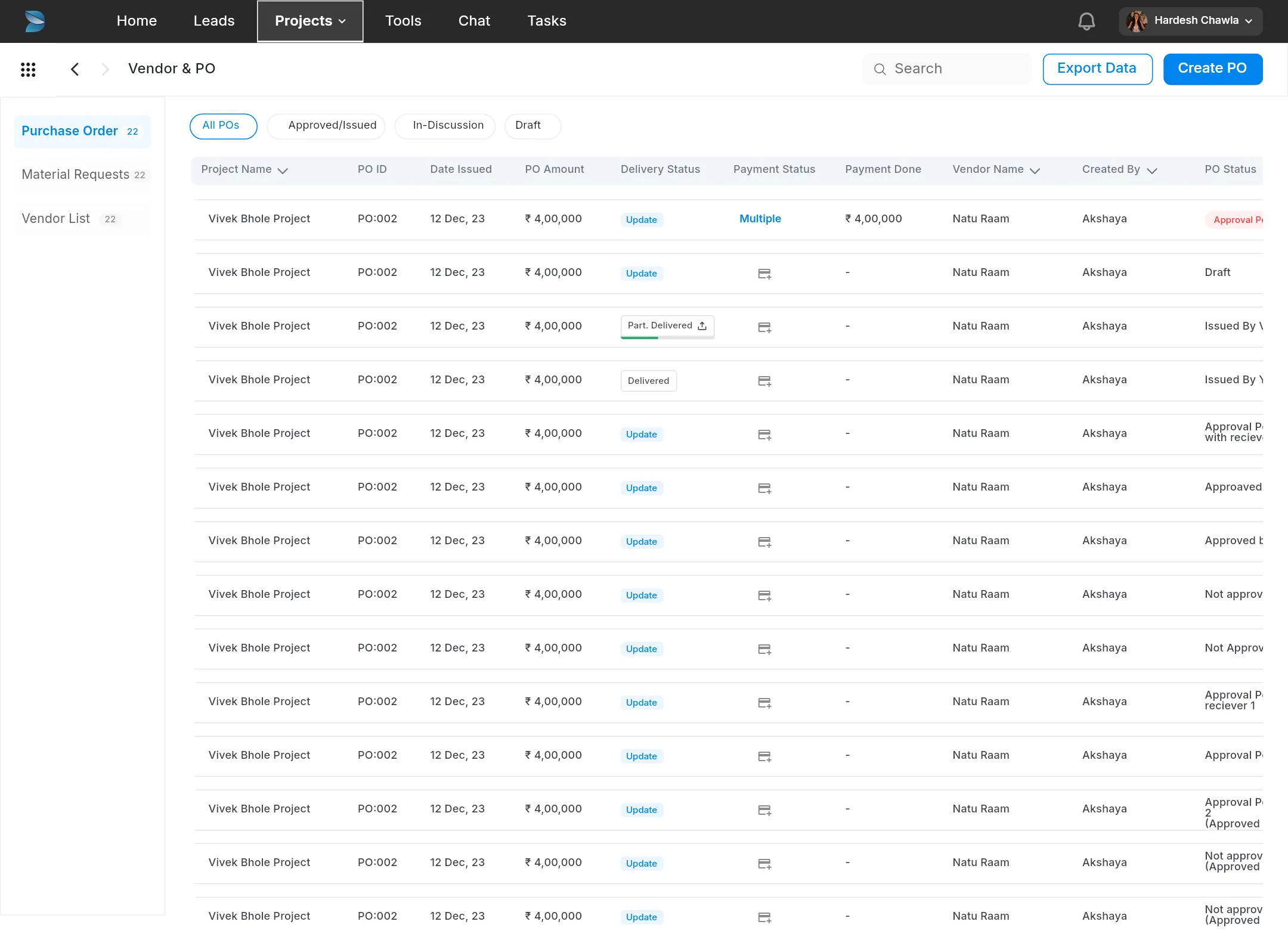
2023
Ver 2.0
The first build: all items, BOMs, material requests, Create PO from work orders, approvals and delivery proof.
32 screens · 18 dialogs
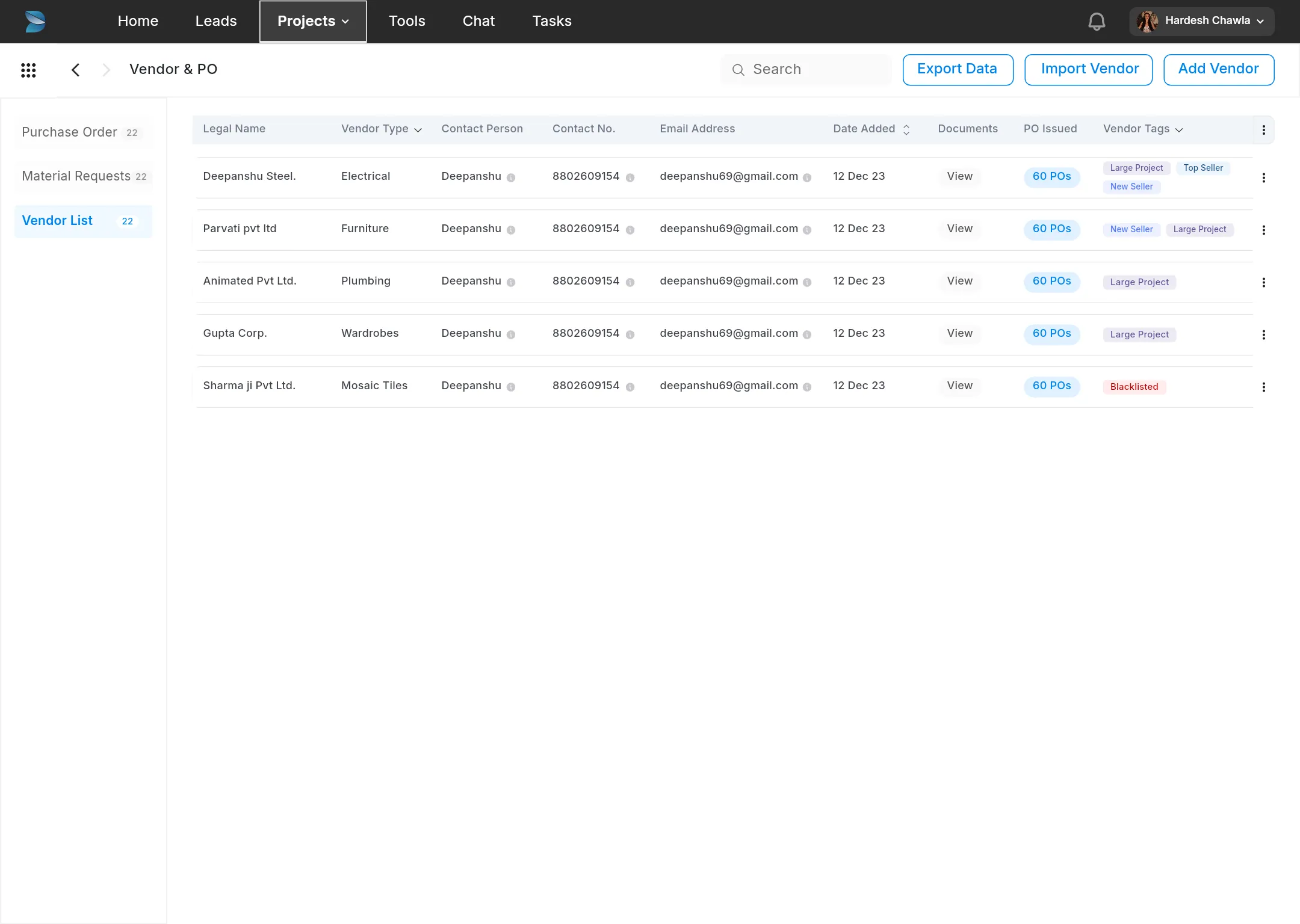
2023–24
Ver 2.1
Nine areas reworked together, each with a written change list. Status chips, counts, and BOQ rates while choosing items.
37 screens · 52 dialogs
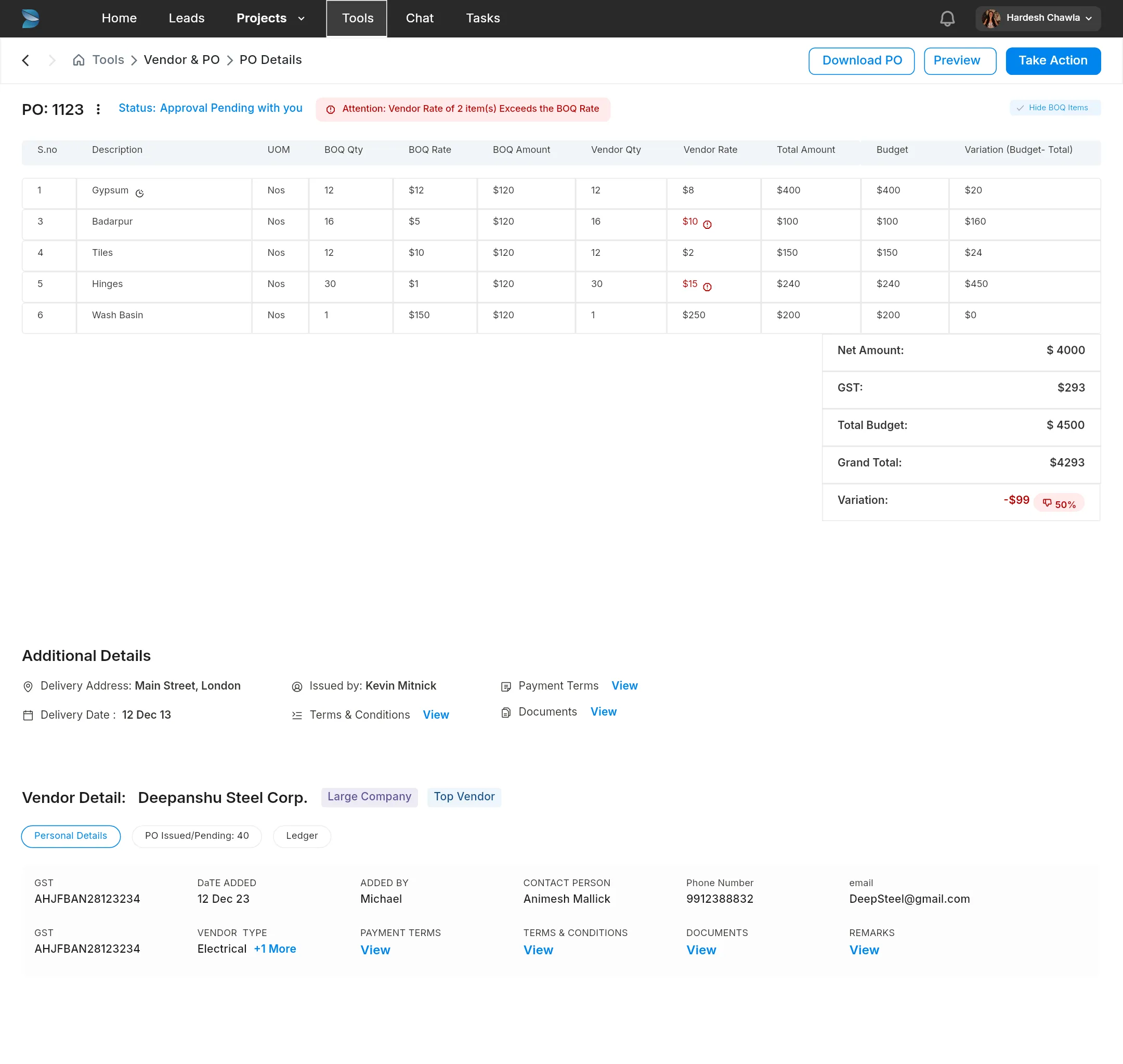
Jul 2024
Ver 2.2
Requests from firms in daily use: custom PO numbers, taxes, vendor documents and sharing. Requests for quotation were designed, then put on hold.
33 screens · KT 4 and 19 Jul 2024
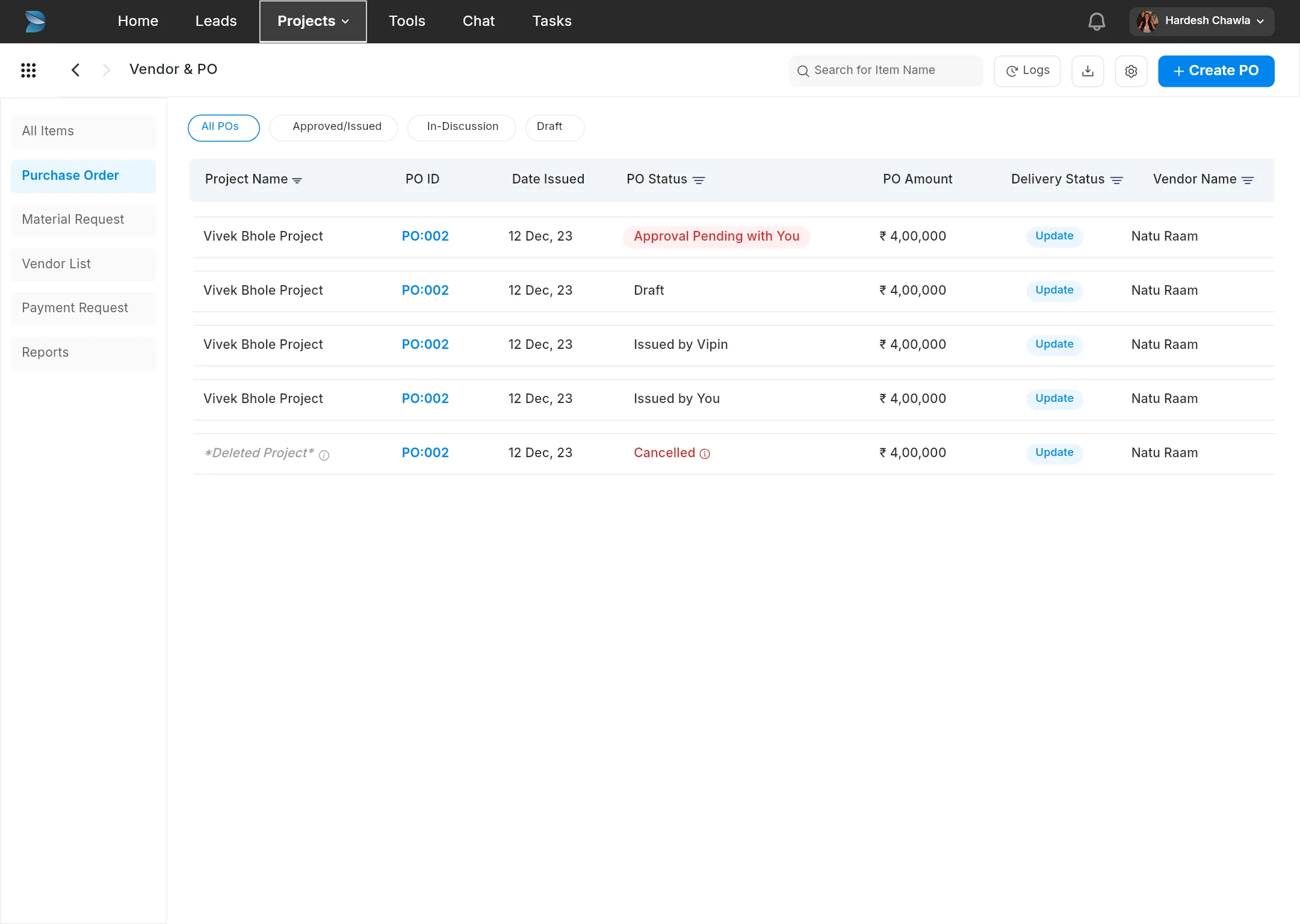
Aug–Dec 2024
Ver 2.3
The rules phase: PO settings, auto-approval and guardrails, plus rate warnings, the parts-versus-item lock, reports and payment requests.
133 screens · KT 20 Aug and 10 Sep · released 15 and 19 Oct
2025
Redesign
One layout for every list, Create PO in three steps, settings in a drawer, delivery logs and invoice booking.
146 screens · KT 21 Jan 2025
What each phase added
Four phases, from version 2.0 to 2.3, shown through the screens that changed most.
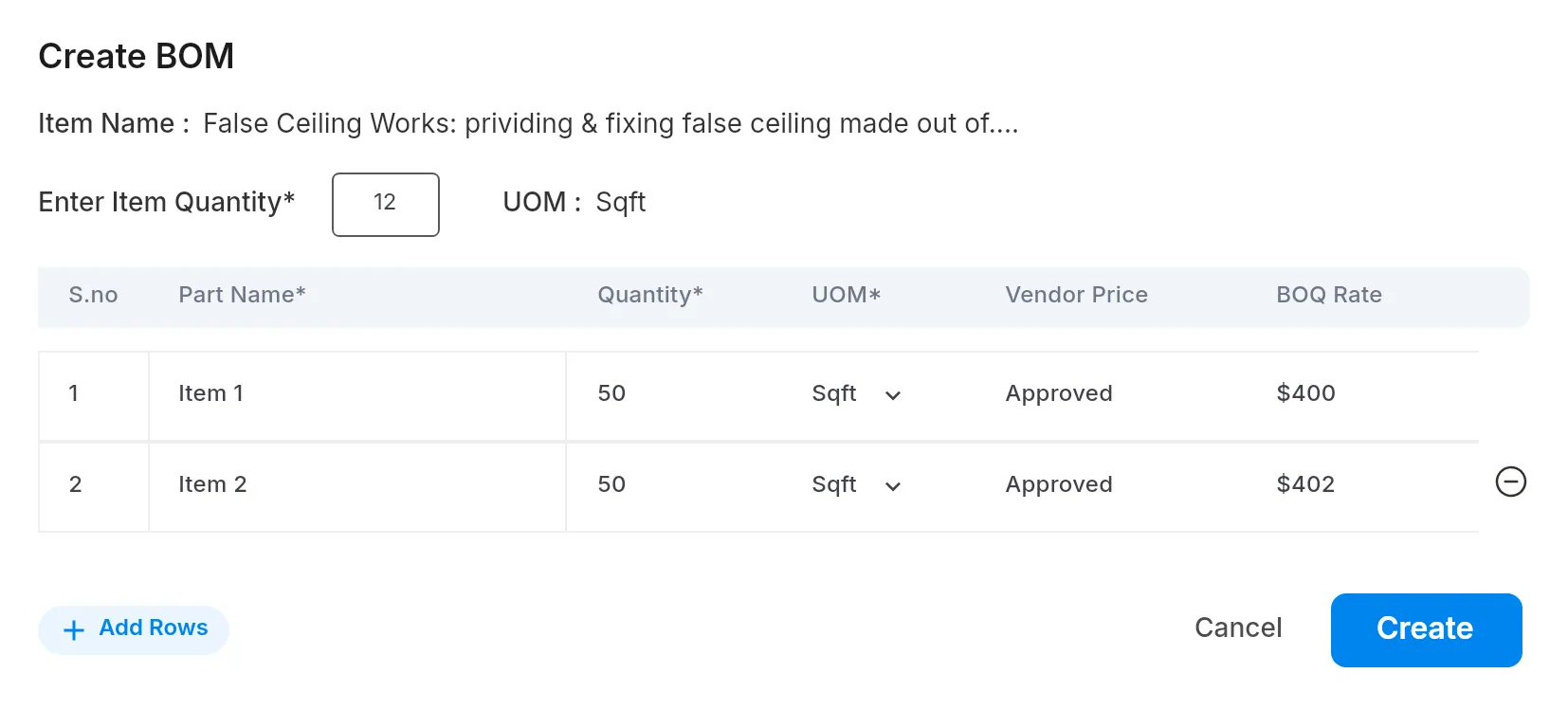
Ver 2.0 · 2023
The whole chain in the product, in one long flow.
- Items with BOMs, material requests, an approval step and delivery proof.
- Create PO on one page, with the BOQ rate, MR, issued quantity and budget on every line.
- The budget showed only as an overspend, after the PO was created.
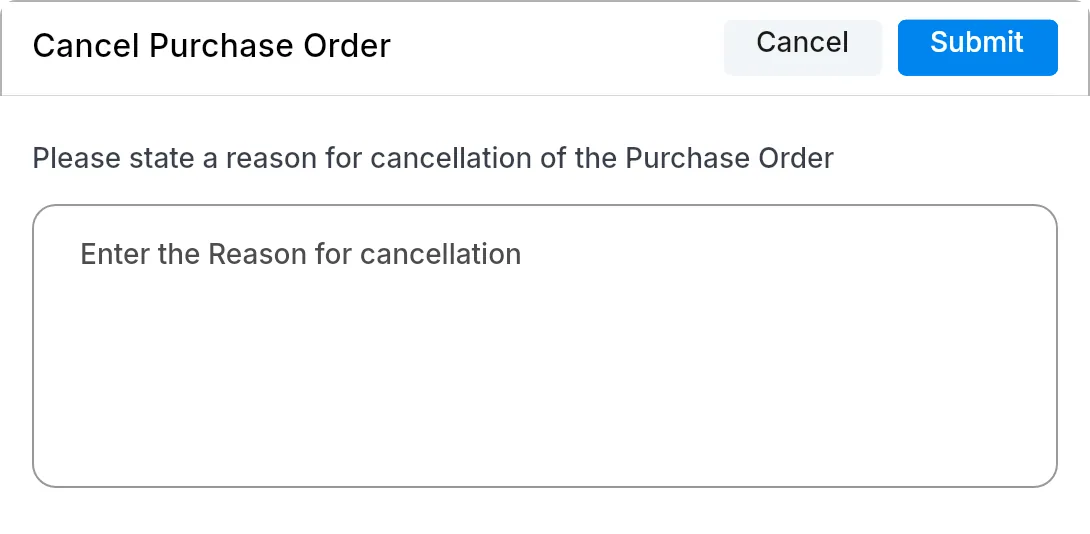
Ver 2.1 · 2023–24
Nine areas reworked together, each with a written change list.
- Status chips, counts and a delivery-status column on company-level POs.
- Choose the BOQ in Create PO, with its rate and amount on each line.
- “Issue PO” with a link, a download or sharing; cancelling needs a reason.
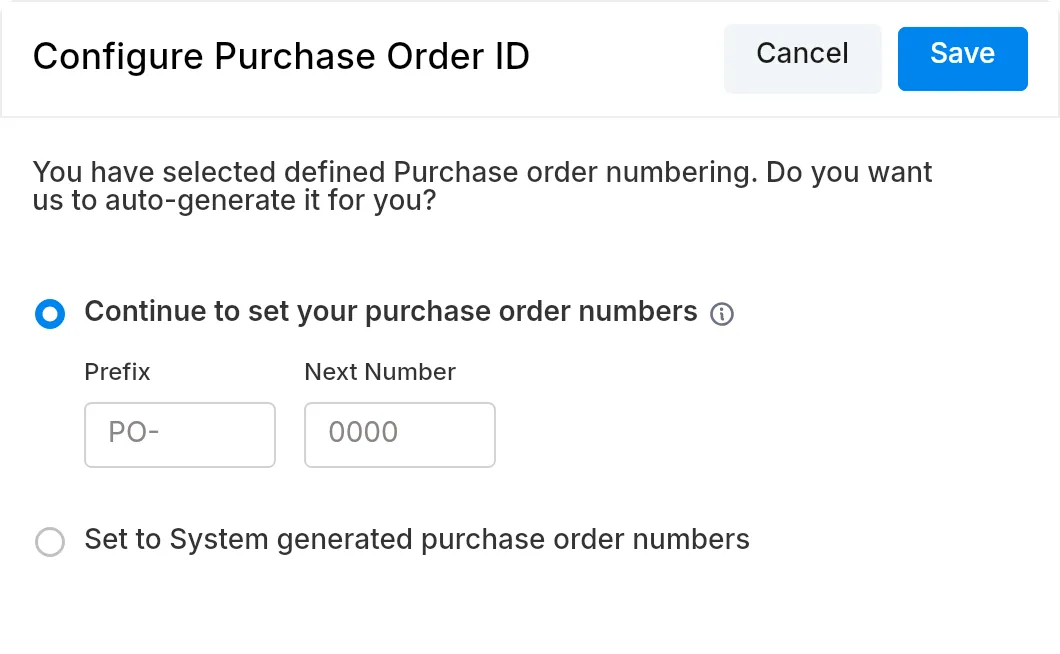
Ver 2.2 · July 2024
Handed over on 4 and 19 July 2024, from firms using it daily.
- The firm’s own PO numbering.
- Taxes, discounts, and vendors with types, tags and documents.
- Requests for quotation were designed, then parked.
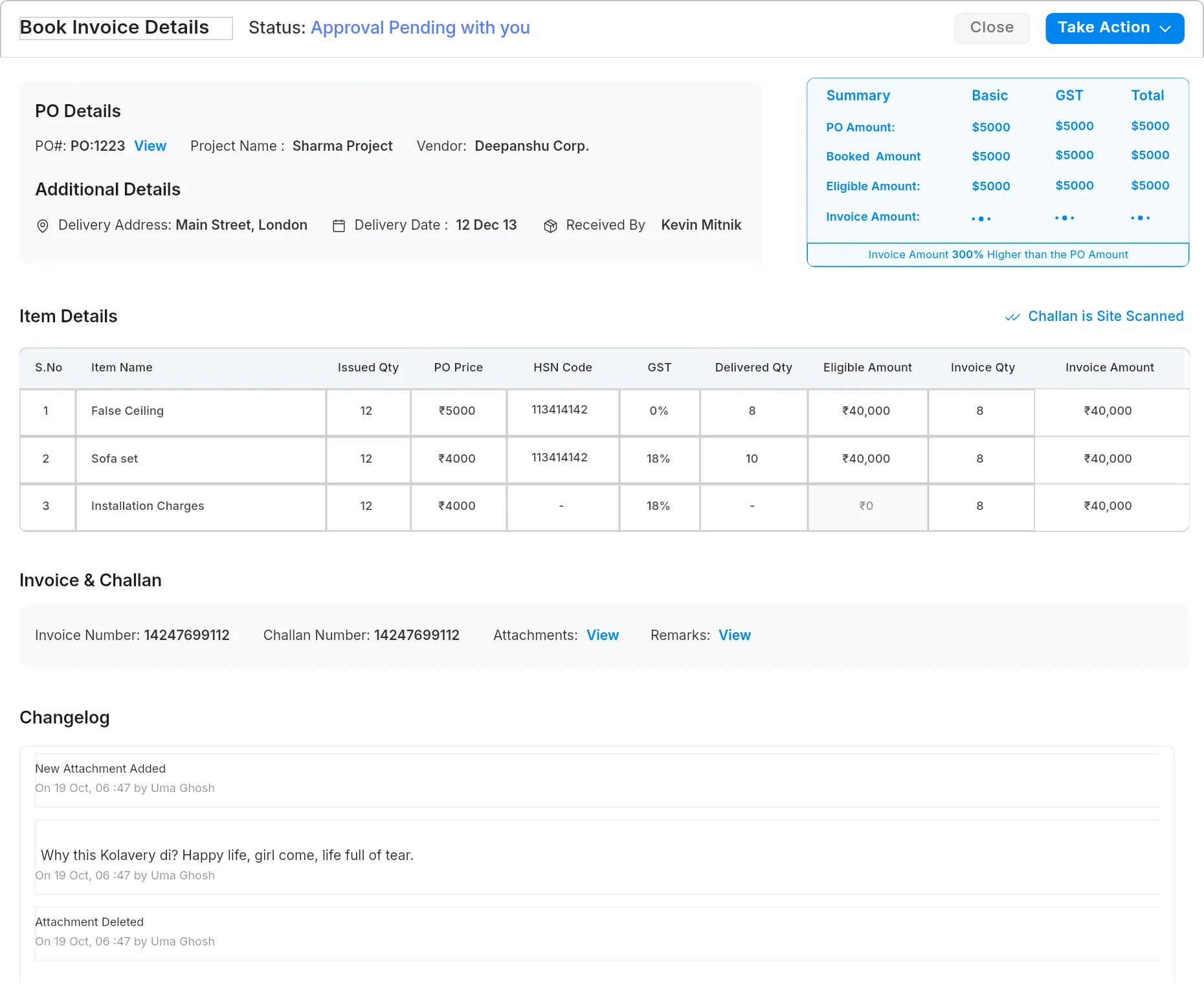
Ver 2.3 · Aug–Dec 2024
The rules phase: handed over in August and September, released in October 2024.
- PO settings, auto-approval limits and spending rules.
- The vendor rate checked against the BOQ rate, and parts that lock the main item.
- Payment requests, and invoices that warn when they exceed the PO.
Final design
The 2025 redesign brought the lists into one layout, made PO creation three steps, and clarified settings, deliveries and payment requests.
Views
Purchase orders24
Material requests6
Vendors18
Payment requests4
Deliveries11
Reports
PO settings
Purchase orders24 POs · ₹38.4 L issued this year
ActiveSpending rulesPO ID
What happens when a PO crosses a limit.
BudgetOver the item’s budget
Ask for approvalOutside quotationNo BOQ line
Ask for approvalOrder quantityMore than the MR
Let it throughParts of an itemBOM part by part
Stop itAuto-approvalMansi S.
Up to ₹2 lakhActivityPO-014
×Delivery log GRN-08 createdRavi · Fri, 15 Nov, 10:14
Delivery log GRN-07 editedRavi · Wed, 13 Nov, 09:02
Delivery log GRN-06 deletedRavi · Tue, 12 Nov, 18:40
PO issued to the vendorAvinash R. · Tue, 12 Nov, 11:20
Approved past the budget ruleAvinash R. · Tue, 12 Nov, 11:18
New material requestSharma Residence
×BOQ line
False ceiling · Foyer▾
Due date
Fri, 8 Nov▾
+ Add an item outside the quotation
Order historyGypsum board 12.5 mm · False ceiling
×Ordered120 of 120 sqft
BOQ rate₹58
Average rate₹61
Design proposal
The current flow hides spending rules until after a PO is created. This unshipped 2026 proposal brings them into the order form.
Vendor and rates
- The BOQ rate sits under every vendor rate, and each line shows the difference in rupees. This replaces the difference column that only filled in after the order went out.
- The average price sits next to the rate field. In 2.3 it was in a separate dialog.
- Non-tender lines are marked on every screen, because they have no budget to be checked against.
- One currency format: tabular figures, Indian grouping, right-aligned. The file’s sample data mixed $ and ₹; I corrected that here.
Budget left on these BOQ lines₹46,920
This PO, on the same lines₹47,640
₹720 over the budget for these linesWhen you send, these rules apply
- !Budget · ask for approvalLines 1 and 5 are above their BOQ rate; together they go ₹720 over.
- ◆Outside-quotation item · approval requiredCove light profile has no BOQ line to check against.
- ✓Order quantity · passesEvery quantity is within MR-003.
Or fix it here
- Use the BOQ rate on lines 1 and 5saves ₹2,220 · clears the budget rule
- Move the cove light to its own POclears the outside-quotation rule
Before you send
- The rules show in step 2: each spending rule from settings, in the same wording, with a pointer to where it’s set.
- Remaining budget replaces total budget, since earlier POs have already used part of the total.
- The approval route, before sending: who will approve, why, and whether your own auto-approval limit applies.
- Fixes are suggested in place: use the BOQ rate, or move a non-tender item to its own PO. Each one names the rule it clears.
What changed
Over two years, the order form grew to link BOQ lines, approval rules, deliveries, invoices and payments to each PO.
What worked
Next time